
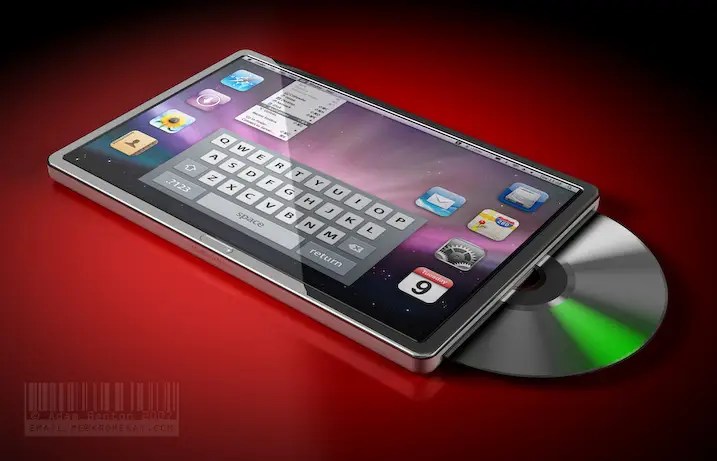
Before the iPad launched back in 2010, the rumour mill was awash with different theories of what Apple’s tablet – or ‘iSlate’ as it was then known based on a domain registration uncovered by an up-and-coming Mark Gurman – would be like. The prevailing theory for many years was that this would be based on Mac OS X and usher in a new era of touch-based computing for Apple’s desktop platform. Concepts created in the late noughties are especially amusing to look back on with the benefit of 14 years’ hindsight. Many included a built-in SuperDrive and multiple ports, and an operating system which was clearly based on the Mac.
However, when Steve Jobs unveiled the tablet, it was clear that this device was a direct descendent of the most successful consumer product of all time: the iPhone. It had the same buttons, the same single 30-pin charging port, and the same OS. It was, for all intents and purposes, a larger iPod touch. Of course, apps were optimised for the 9.7” screen, and there were purpose-built accessories such as the (portrait-only…) keyboard dock which separated the iPad from its smaller sibling. But this uncanny resemblance provided ammunition for tablet (and Apple) sceptics.
In their first impressions post, PCWorld were less than impressed:
But at the end of the day, the show’s centrepiece – the iPad — is just a big iPod touch. Lots of folks will want it, in a hypothetical sort of way. But it’s hard to imagine all that many of them will fork over the initial $499 for a crippled version, or as much as $829 (for the 64 GB/3G model you’d want).
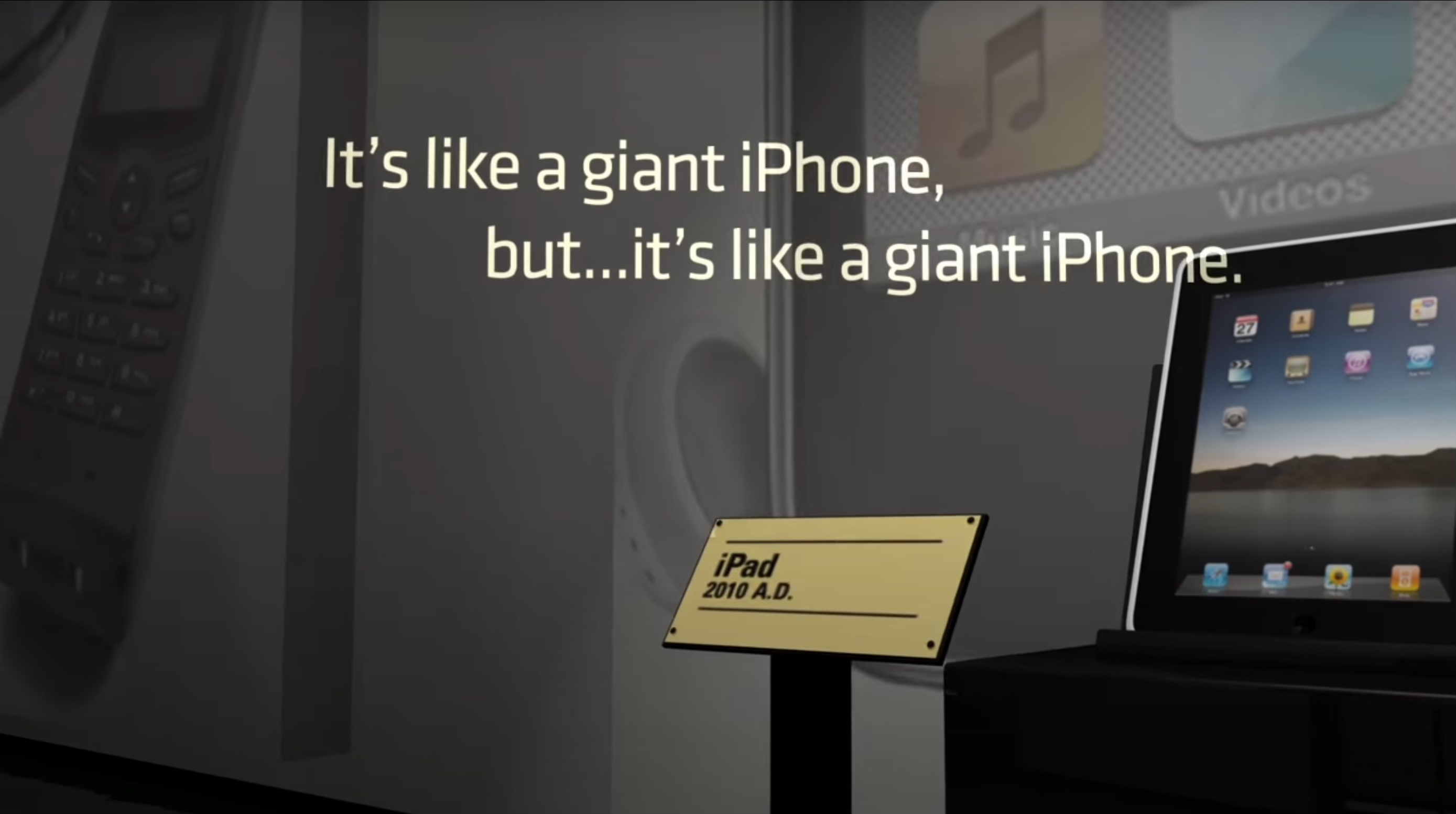
Motorola even mocked Apple in their ‘Tablet Evolution’ ad when advertising the launch of their 2011 Xoom tablet: ‘it’s like a giant iPhone, but… it’s like a giant iPhone’.
Almost a decade and a half later, and Apple has succeeded in putting clear space between the iPhone and iPad, and bringing it slightly closer to those early Mac-like concepts. The iPad now supports a stylus in the Apple Pencil; it supports more advanced multitasking in the form of Stage Manager, even if this implementation was initially controversial; it comes in a variety of sizes larger than the original 9.7” model; it supports Logic and Final Cut; it has multiple ports when paired with the Magic Keyboard; it has support for a cursor; and it is also generally a landscape-first device. Whilst at times it still feels like the iPad is an awkward middle child – too complicated for iPhone Town but too simple for Mac Town – gradually the device has carved its own path and has a loyal set of both casual and professional users. It has also provided the foundations of Apple’s newest platform, visionOS, underlying the iPad’s software credentials.
However, in 2023 the iPad hardware received zero updates, unless you count an extremely odd USB-C Apple Pencil. Does this signal a shift in Apple’s priorities? Or was it simply a consequence of resource being dedicated to launching products such as Vision Pro? Whatever the reasoning, it’s highly likely that in 2024 we will get a whole host of refreshed iPad models – maybe even as soon as next month. As much as Apple has diverged from the iPad just being a giant iPhone, there are numerous things I would like to see the iPad gain from the smaller device, both in hardware and software. There is a lot to learn from Apple’s halo product: here is my iPhone-inspired wish list for the iPad this year.
Hardware
- An OLED screen. This almost seems a given based on the latest rumours, but it can’t be overestimated how big an improvement this would be. The iPhone first gained an OLED screen with the iPhone X way back in 2017, but most iPads have remained on the same LCD technology for years. The one exception is the 2021 and 2022 12.9” iPad Pro models which use mini LED – these can produce brighter images and display HDR content, but have been criticised for blooming issues. An OLED panel should provide the best of both worlds, with high contrast, deep blacks, and no blooming. It would be perfect for one of the iPad’s main use cases – entertainment – and will surely be the flagship feature of the next iPad Pro.
- Waterproofing. The iPhone has been at least splash resistant since the iPhone 7, but the iPad is still vulnerable to a mistimed spillage. I often like to use my iPad outside or at the beach, and although I don’t intend to dunk it into water very often, an IP rating for water resistance would be much welcomed. There have been very few rumours suggesting this will be the case, but at this stage I am not sure what Apple are waiting for. Unlike a MacBook with its exposed hinges and keyboards which are open to the elements, the iPad is one sealed slab of glass and aluminium – just like a giant iPhone.
- MagSafe. When this was first rumoured, I must admit I was a bit confused as to why this would be a benefit. I certainly don’t think adding iPhone-style MagSafe is a must for the iPad line – for one, it would require some kind of different material to be used on the rear, or a large enough cut-out in the aluminium shell which may affect weight and durability – but there are certainly scenarios where it would make sense. Although an iPad is unlikely to fit many traditional MagSafe or Qi2 stands, being able to use a standard MagSafe puck would be convenient if already using one to charge your iPhone. There is also the possibility of more niche accessories – I’d definitely appreciate some kind of MagSafe stand when using my iPad to follow along with recipes in the kitchen, for example. (There is the question of whether the existing Smart Connector could already allow accessories like this, but there seems to be essentially zero use of this outside of Apple’s first-party keyboard accessories.)
- Spatial video recording. This was introduced on the iPhone 15 Pro, and allows users to record video in 3D, which can then be rewatched on Vision Pro. Having recently demoed the headset whilst in the US, I can say that the example spatial video was one of the most compelling parts of the experience, and immediately made me want to record more in spatial mode to have ready for when I eventually own a Vision product. However, the iPhone is not ideal for this – the lenses are barely a couple of centimetres apart, and this limits the extent of the ‘3D-ness’ of the video. Whilst taking photos and videos on an iPad is still somewhat of a social faux pas, I’d argue it’s far less strange than strapping on a bulky headset and carrying an external battery to take some holiday snaps. The iPad also has the advantage of physical space: cameras could be placed much closer to the natural position of our eyes than on the iPhone. If Vision Pro and spatial computing really are the future, I’d like to see Apple capitalise on their diverse ecosystem of devices to expand the ways in which things like spatial video can be captured. What could this look like? Ideally, we’d have multiple 1x cameras mounted in a camera bar (Google Pixel-esque) in either portrait or landscape. The odds on this happening this year I think are slim, but hopefully, we see something along these lines in the next few years.
- Action button… or buttons? The iPad Air 2 was a fantastic iPad – it introduced a laminated display for the first time, was exceptionally thin and light, and remained feeling modern for many years after its release thanks to its 2 GB RAM and 64-bit processor. It supported a whopping 8 major versions of iOS/iPadOS, from iOS 8 all the way to iPadOS 15. It was, however, worse than the original iPad Air in one major way. It dropped the physical switch for orientation lock/mute and moved all controls to software. Almost a decade since its announcement, I still believe this was a mistake. I would love to see the Action button – which debuted on the Apple Watch Ultra and subsequently the iPhone 15 Pro – make its way to the iPad. Although far-fetched, the iPad is a perfect candidate for multiple Action buttons – what pro user wouldn’t want two or more customisable buttons on their iPad Pro, almost a mini Stream Deck built right into the device? I’d buy one in an instant.
Software
- Dynamic Island. The Dynamic Island was introduced with the iPhone 14 Pro and is technically a combination of both software and hardware – however, the iPad has no need for the razor-thin bezels of the iPhone (you need to be able to hold it!), and therefore has the flexibility to be able to implement a virtual Dynamic Island without the need for a hole punch display. What benefit would this provide? One would be greater integration of Live Activities on iPadOS. Currently, these only reside on the Lock Screen, and without an always-on display, these are seldom useful. Live Activities are slowly but surely gaining traction – in the UK, for example, popular food delivery service Deliveroo has recently added support for them. They are steadily becoming an indispensable way to view information ambiently, and the iPad shouldn’t be left behind.
- StandBy mode. Perhaps the iOS 17 feature which is most underrated is StandBy. It can genuinely transform the context of how the iPhone is used, and the feature has quickly become part of something I rely on and take for granted. StandBy as a feature was fairly perplexing at launch – although useful, it fundamentally changes how the UI for some apps is rendered, and all this effort is only used in a very specific context (when in landscape mode and motionless). The timer, for example, shows a full-screen bright orange countdown bar, unlike anything else in the Clock app. It begs the question whether this is going to be used in other contexts. One obvious candidate is the rumoured HomePod with screen, but this interface would be just as good on an iPad. The bigger screen and propensity to already be in some kind of stand (e.g. a Magic Keyboard) makes this feature even better suited to the iPad than the iPhone. To be really useful, this would also require a hardware change: an always-on display. I can definitely see StandBy being a feature of the next iPad Pro if Apple do indeed adopt an OLED screen with variable refresh rate, although the lack of this doesn’t necessarily preclude StandBy from coming to the iPad: many iPhone models without always-on displays still support this feature, although it is moderately less useful.
- Feature parity with iOS. When iPadOS splintered off down its own path in 2019 with iPadOS 13, the natural assumption was that this was because Apple were going to take the OS further, adding capabilities above and beyond what would be suitable for iOS. Instead, the opposite seems to have happened in numerous instances. Although iPadOS does have some exclusive features such as Stage Manager, multi-window and cursor support, what is often noticeable in iPadOS releases is what it doesn’t include. Widgets on the Home Screen were launched with iOS 14. This feature didn’t come to the iPad until iPadOS 15. The same with the App Library. The customisable Lock Screen came to iPhone with iOS 16. This didn’t come to the iPad until iPadOS 17. The same is true of features such as StandBy, which I wouldn’t be surprised to see in iPadOS 18 this summer. Apple Music Classical took an extra 7 months to migrate the extra few inches from iPhone screen to iPad screen. This trend has continued with the recent launch of the Journal and Apple Sports apps, which are both perplexingly iPhone-only. iPadOS frequently feels like an afterthought, and I’d like to see Apple consistently bringing the latest and greatest features to both iOS-derived platforms.
- A calculator app. Maybe one day?
Conclusion
The iPad Pro hasn’t seen a meaningful update since 2018, and as a result, there’s a lot left on the table. It will be interesting to see how the iPad line evolves in the context of the Vision Pro – in many ways, the Vision Pro is the best iPad money can buy. But that is a lot of money – for most people, right now, the iPad could be the perfect Goldilocks device for many of the intended use cases of Apple’s headset. Although the iPad has been veering ever closer towards being a more desktop-like platform in recent years, borrowing some ideas back from the iPhone would help it once again make the case for being a compelling ‘third device’. If the next iPad Pro revision is like a giant iPhone… that might not be so bad.
 Moof!
Moof! 
Leave a comment